



|
|
Stanley R. Page
Novell Incorporated +1 801 222 7016 | Todd J. JohnsgardNovell Incorporated1555 N Technology Way Orem, UT 84057
+1 801 222 5112 | Uhl Albert
Intel Corporation +1 801 763 2242 | C. Dennis AllenCustomer Satisfactionby Design 810 Skylake Dr Woodland Hills, UT 84653 +1 801 423 1599 |
Mackay [5] found that users did not take advantage of the customization features of software as often or successfully as they could, and she identified some of the triggers and barriers to customization. The three most commonly cited reasons for customizing software were that users: 1) noticed their own repeated patterns and wanted to customize to match those patterns, 2) wanted to fix or stop something that was annoying or slow, and 3) wanted to retrofit new versions of software to make them work as they did in the previous version. The most often mentioned barriers to customizing software were lack of time followed by how difficult the software was to customize.
Oppermann and Simm [7] studied the use of customization features in word-processing, spreadsheet, database, and drawing applications. About one-half of the users stated that they had tried some of the customization options. They made changes to preference settings (e.g. changed display measurements from inches to cm) and created styles. A few users recorded macros and made modifications to the menus when these options were available. They indicated that customization options made their work easier and saved time. However, many users said that they simply made changes out of curiosity or for fun.
Customization is a key element of many types of applications. Trigg, Moran and Halasz [9] described the importance of customization in the design of an information structuring application called NoteCards. HyperCard [10] was one of the first commercial products designed to make it easy for users to create customized applications. Jones [1] found that customization was one of four major recurring themes among users of different styles of e-mail systems.
MacLean, Carter, L�vstrand, and Moran [6] were able to establish a successful "tailoring culture" within an organization. They first developed a software system that was easy to customize. Then, they "seeded" the novice users' systems with sample custom tools built by expert peers. They also provided ways to share customization files through e-mail. Providing simple tools and a support system of experts for helping with customization made it possible for the novice users to become proficient at customizing their software.
Others have found that customization can be successful when the proper formal and informal support is in place. Krogs�ter, Oppermann, and Thomas [3] designed a successful automated system that analyzed user actions in a spreadsheet application and suggested ways of customizing the interface to make their work easier. Mackay [4] found that users spontaneously shared customization files within their organization. Gantt and Nardi [2] found that informal experts naturally emerged who helped co-workers customize their systems.
The purpose of the current study was to identify the customization features used in a commercial word-processing application (WordPerfect 6.0a for Windows). This information will help software developers make informed decisions about how successful they have been in providing customization features, what aspects of the interface users want to customize, and how to provide an optimal set of functionalities by default.
Potential participants were drawn from the WordPerfect 6.0a for Windows software registration database. They were called and told that we were doing a study of general use of word processors and asked whether they were willing to participate. They were not told that software customization was the focus of the study.
A total of 101 participants from across the United States completed the study. Participants matched the distribution of users in our fourteen top market segments. For example, if the government industry accounted for 19% of our sales we collected 19% of our data from government sites.
Although we did not control for user characteristics we noticed several interesting demographics about our sample population:
The job categories listed by the participants covered a broad spectrum and included: Administrative Assistant (13.9%), Secretary/Data Entry (18.8%), Manager (11.9%), Educator/Trainer (10.9%), Programmer/MIS (9.9%), Engineer (6.9%), Consultant (5%), and Sales/Marketing (4%).
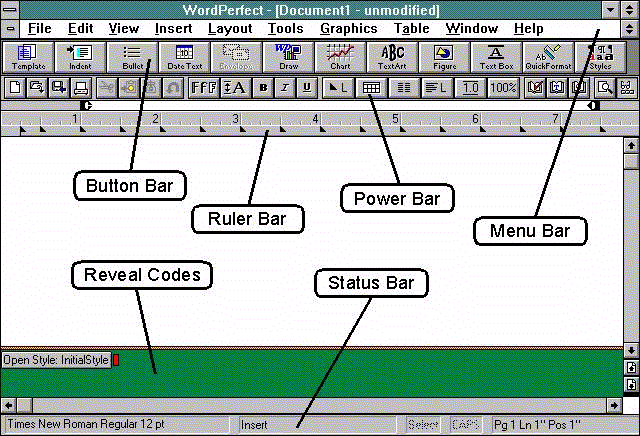 |
| Figure 1. Application window with all interface tools showing. The Button Bar, Power Bar, and Status Bar were showing by default when users started the application. Reveal Codes and the Ruler Bar were hidden at startup. |
One type of data we collected was how participants customized the interface elements of the software. Figure 1 shows the interface tools within the application window. Table 1 defines each of the interface tools and describes their customization options.
Interface Tool |
Purpose |
Customization Options |
| Menu Bar | Provides access to most of the features and functions in WordPerfect. | Contents and order. |
| Button Bar | Offers quick access to common features. | Position, contents, order, labels (text, icon, text and icon), font, font size, and whether or not displayed. |
| Power Bar | Offers a quick way of performing common tasks. | Contents, order, and whether or not displayed. |
| Ruler Bar | Displays margins, tab settings, and other formatting information. | Appearance and whether or not displayed. |
| Reveal Codes | Displays the codes that WordPerfect inserts for every formatting feature used in a document. | Whether or not displayed. |
| Status Bar | Displays document information, such as the type of font. | Contents, order, appearance, and font. |
We also collected data about the amount of work participants did in the software along with their use of styles and macros for 28 days. A style is a collection of font attributes and other text formatting properties (such as justification) that can be reused and applied to several areas of text. Macros can record and play back a series of actions to perform repetitive tasks quickly.
A questionnaire was used to collect data about user characteristics. The questionnaire contained 31 questions in the following categories: experience levels, organizational characteristics, WordPerfect usage, documentation and training, interface preferences, personal characteristics, comfort with computers, system characteristics, and work characteristics.
Participants performed the study on their own IBM-compatible computers running WordPerfect 6.0a for Windows. Participants received a diskette in the mail and ran a macro on the disk which presented them with the questionnaire. After 28 days the software customization and usage files were copied from their hard disk.
The disks were mailed back to us for analysis. There were three types of files on the disks: 1) questionnaire responses, 2) software and macro usage files, and 3) customization configuration files. We analyzed the responses from the questionnaire and were able to re-create each participant's WordPerfect configuration with the obtained customization files. Screen shots were generated based upon the configuration files and compared against the default configuration to assess the amount of customization performed.
A surprising 92% of the participants in this study did some form of customization of the software. The maximum number of changes made by a participant was 54. The mean was 9.1. Eighty-six percent made changes to their general preferences settings (e.g., number of minutes between automatic file backups). Sixty-three percent made use of custom functionality in macros. Seventy-seven percent customized the software interface (primarily through the customizable Button Bar) to add or change access to their functionality.
Tests of effects were run to compare the level of customization to the user characteristics captured in the questionnaire. There was no significant correlation between the level of customization and user characteristics including computer experience, job title, education, age, gender, or learning method.
The only significant variable found was the relationship between the amount of customization and how much the software was used (p < .05). The more the software was used, the higher the level of customization.
We identified five categories of customization activities from the data collected: 1) customizing functionality, 2) customizing access to interface tools, 3) customizing access to functionality, 4) customizing visual appearance, and 5) setting general preferences. Findings in each of these categories are described below.
Because macros allow users to automate a series of steps they are a primary means for creating custom functionality. Sixty-three percent of the participants used macros. These macros included some that shipped with the application, macros that participants had created for themselves previously, or macros that others had created and shared with them. The use of macros suggests that participants want custom functionality that more directly supports their work.
The application contained a "macro recorder" that allowed participants to capture or record a series of actions (such as keystrokes and mouse clicks) and play them back at will. Sixteen percent of the participants created their own macros using the macro recorder during the 28 days of the study. The mean number of macros created was nine. One participant recorded 25 macros.
Styles was another feature that allowed users to create custom functionality. Styles in WordPerfect provide a way to format similar types of text, such as headings and lists. Thirty-three percent of the participants made use of the styles functionality.
Figure 1 shows the various interface tools that were available for display in the product. When participants started the application the Button Bar, Power Bar, and Status Bar were displayed by default. The Ruler Bar and Reveal Codes were hidden by default.
Table 2 lists the permanent changes that participants made to the display of the interface tools. Twenty-five percent of the participants changed their preference settings to always display the Ruler Bar. The Ruler Bar provides an easy way to visually check and make changes to document margins and tab settings.
Display of Tools |
Percent |
| Showed Ruler Bar |
|
| Removed Button Bar |
|
| Showed Reveal Codes |
|
| Removed Power Bar |
|
| Removed Status Bar |
|
Sixteen percent of the users removed the Button Bar. The Button Bar provided quick and easy access to functionality that was also available through the pull-down menus. Presumably these individuals preferred to have more room for the display of their document than easy access to those functions.
As shown in Table 3, the button bar was positioned at the top of the application window by default and most users (78%) left it there. Over half of those who moved the bar moved it to the left side of the window. Only one person positioned the button bar as a floating palette (separate window that overlaps the application window).
Position of Button Bar |
Percent |
| Top of Window (Default) |
|
| Left Side of Window |
|
| Bottom of Window |
|
| Right Side of Window |
|
| Floating Palette |
|
The Button Bar was the most customizable of the available interface tools. It allows users to add buttons for virtually any feature of the product. Users can also add buttons for running macros or launching other applications. Buttons can be removed, spaces can be added to form groups of buttons, and the order of buttons can be changed. Seventy-seven percent of the users did something to customize their Button Bar. The Button Bar is an ideal customization tool because it is easy to customize and makes the desired functionality visible and accessible.
Table 4 shows the types of customizations made to the button bar. The high number of users who customized the Button Bar show that users want easy access to functions that are important to them. The fact that 44% of the users removed buttons that were on the bar by default suggests that better defaults could have been chosen by the designers.
Button Bar Customization |
Percent |
| Added buttons for new features |
|
| Removed buttons |
|
| Re-arranged the buttons |
|
| Added buttons for macros or applications |
|
The application allowed customization of the pull-down menus, but only 4% of the participants made any changes to them. Two percent added specific macros to their pull-down menus. That few participants made changes to the menus suggests that they are more concerned about surfacing desired functionality than reorganizing it.
 |
| Figure 2. Button Bar with text-only buttons to allow room for multiple-row buttons. |
Appearance of Buttons on Button Bar |
Percent |
| Text and Icon (Default) |
|
| Text Only |
|
| Icon Only |
|
| Made Text Larger on Buttons |
|
| Made Text Smaller on Buttons |
|
The program contains a feature that automatically saves backup copies of the file the participant is working on. The "Minutes Between Backups" setting controls how frequently these backups are made. The default setting on "Minutes Between Backups" was ten minutes. Thirty-seven percent of the participants changed this setting. Seventy-six percent of those making a change reduced the amount of time between backups (mode = 5 minutes). It appears that because of the importance of documents, participants want the security of frequent backups in case something goes wrong.
The "Zoom Percentage" controls the size of the text on the screen without changing the size on the printed page. The default setting was "100%." Fifteen percent of the participants changed the zoom setting. Most of these participants set the zoom slightly larger (mean = 117%). One of the zoom setting options was "Margin Width" which set the zoom display to the largest possible setting while still displaying all the text between the side margins. Since most of the changed zoom percentage settings were not rounded numbers (i.e. 133,119, 107, etc.) it is probable that they were set with the "Margin Width" option. It appears that these participants wanted the text to be as large as possible on the screen without having to scroll horizontally to see their text.
In this study we identified five types of software customization: customizing functionality, access to interface tools, access to functionality, visual appearance, and general preferences. Here is an overview of their usage:
Mackay [5] states that her "data support the idea that users 'satisfice' rather than optimize." They do the minimum necessary to get by. We found that participants who used the software heavily also did a lot of customization. So, rather than being "too busy" to bother customizing, our data suggest that users with high levels of product use adapt the software to complete tasks more easily. That only 4% of the participants in this study modified the menu bar, suggests that users are making required functionality more visible rather than reorganizing it.
2. Gantt, M. and Nardi, B.A. Gardeners and gurus: Patterns of cooperation among CAD users. In Proceedings of CHI'92 Conference on Human Factors in Computing Systems (Monterey, California, May 3-7, 1992), ACM SIGCHI, pp. 107-117.
3. Krogs�ter, M., Oppermann, R., and Thomas, C.G. A user interface integrating adaptability and adaptivity. In Oppermann, R. (Editor), Adaptive User Support: Ergonomic Design of Manually and Automatically Adaptable Software, Hillsdale, NJ: Lawrence Erlbaum Associates, 1994, pp. 97-125.
4. Mackay, W.E. Patterns of sharing customizable software. In Proceedings of the Conference on Computer-Supported Cooperative Work (Los Angeles, California, October 7-10, 1990), ACM SIGCHI & SIGOIS, pp. 209-221.
5. Mackay, W.E. Triggers and barriers to customizing software. In Proceedings of CHI'91 Conference on Human Factors in Computing Systems (New Orleans, Louisiana, April 27-May 2, 1991), ACM SIGCHI, pp. 153-160.
6. MacLean, A., Carter, K., L�vstrand, L, and Moran, T. User-tailorability systems: Pressing the issues with buttons. In Proceedings of CHI'90 Conference on Human Factors in Computing Systems (Seattle, Washington, April 1-5, 1990), ACM SIGCHI, pp. 175-182.
7. Oppermann, R. and Simm, H. Adaptability: user-initiated individualization. In Oppermann, R. (Editor), Adaptive User Support: Ergonomic Design of Manually and Automatically Adaptable Software, Hillsdale, NJ: Lawrence Erlbaum Associates, 1994, pp. 14-64.
8. Rosson, M.B. The effects of experience on learning, using, and evaluating a text-editor. Human Factors (1984) 26, 463-475.
9. Trigg, R.H., Moran, T.P., and Halasz, F.G. Adaptability and tailorability in NoteCards. Proceedings of IFIP INTERACT'87: Human-Computer Interaction (1987), 723-728.
10. Williams, Gregg. HyperCard: HyperCard extends the Macintosh user interface and makes everybody a programmer. Byte (December 1987) 12, 109-117.